Report Section
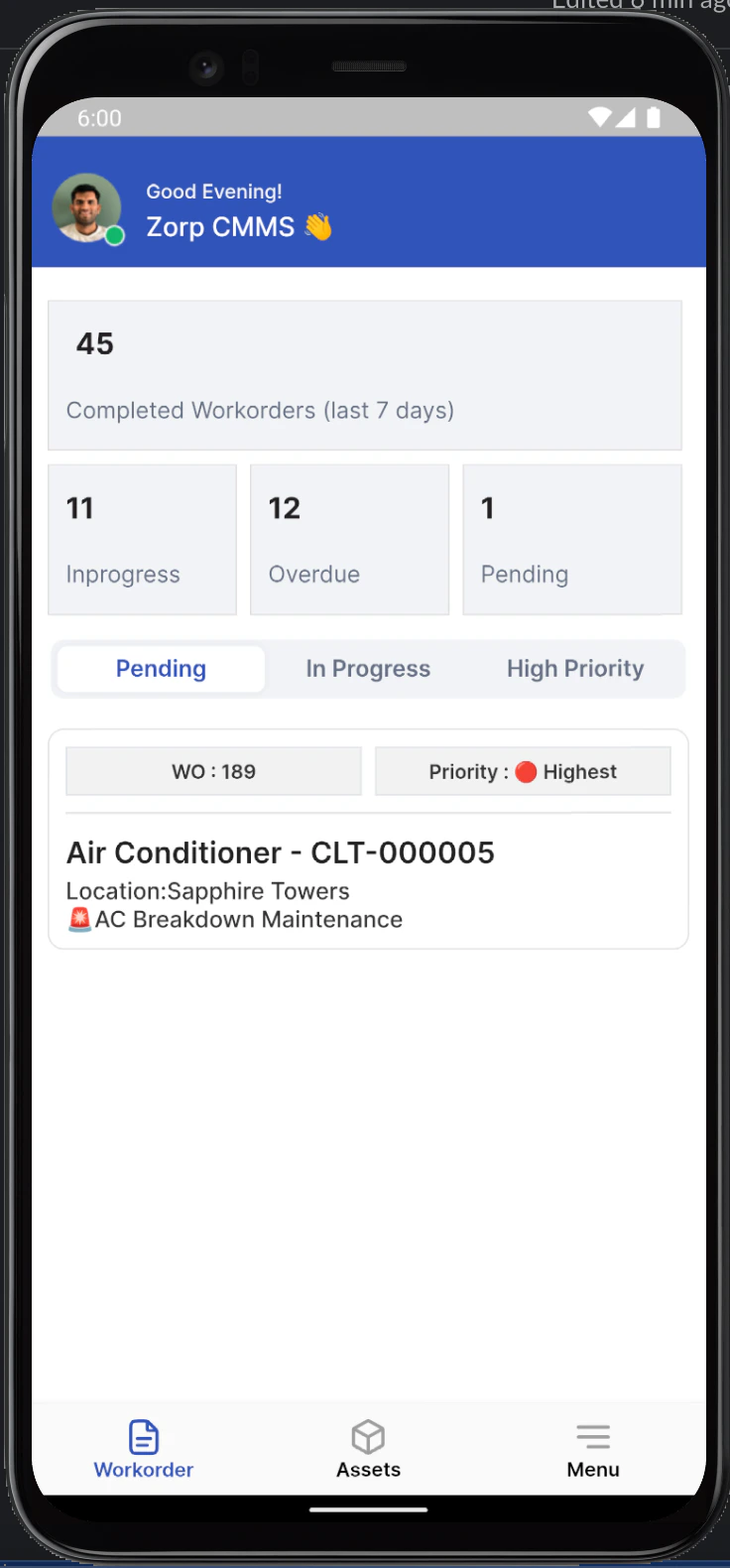
This section provides a summary of the completed and pending work orders over the last 7 days.-
Completed Workorders: Displays the total number of work orders completed in the last 7 days.
- Count: The number
45indicates the completed work orders.
- Count: The number
-
Workorder Status:
- In Progress: Shows the number of work orders currently in progress (
11). - Overdue: Shows the number of overdue work orders (
12). - Pending: Shows the number of pending work orders (
1).
- In Progress: Shows the number of work orders currently in progress (
Workorder Tabs
These tabs help to filter the work orders based on their status:- Pending: Displays work orders that are yet to be started.
- In Progress: Displays work orders that are currently being worked on.
- High Priority: Displays work orders marked as high priority.
Workorder Details
This section shows details of individual work orders including:- Workorder Number: Unique identifier for the work order (
WO: 189). - Priority: Indicates the priority level of the work order (
Highestwith a red dot). - Title: Brief description of the work order (
Air Conditioner - CLT-000005). - Location: Location where the work order is to be executed (
Sapphire Towers). - Type: Type of maintenance required (
AC Breakdown Maintenance).
Navigation Menu
At the bottom of the home screen, there is a navigation menu with the following options:- Workorder: View and manage all work orders.
- Assets: View and manage assets.
- Menu: Access additional app settings and options.
Visual Guide