

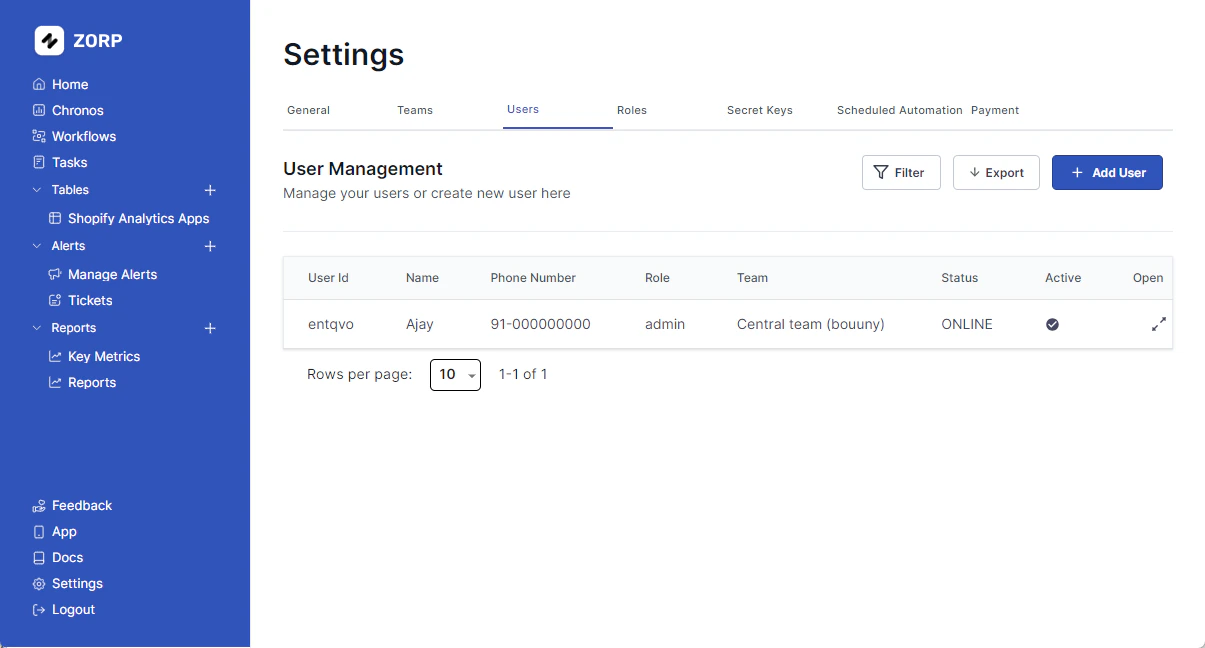
Adding a User
To add a new user, click on theSettings tab on the left sidebar
- Click on the
Userstab - Click on the
Add Userbutton. - Fill in the user details.
- Click on the
Create Userbutton.
Editing a User
To edit a user, head over to theSettings tab on the left sidebar
- Click on the
Userstab - Open on the user you want to edit
- Click on the
Editbutton - Edit the user details
- Click on the
Update Userbutton
Deleting a User
To delete a user, click on thesettings tab on the left sidebar
- Click on the
Userstab - Open on the user you want to delete
- Click on the
Deletebutton - Confirm the deletion
Changing a Users Password
Firstly, head over to theSettings tab on the left sidebar. Then continue following these steps:
- Click on the
Userstab. - Open on the user whose password you want to edit.
- Click on
Change Passwordbutton. - Type & Re-type the new password.
- Hit
Change Passwordbutton.
Cool Add Ons
Your team is 1000+? No worries! ApplyFilter and save time.
You can also Export your user list. Just saying.